
Computer Tune-Up Basics
If you want your computer or laptop to last and perform well for years, regular tune-ups are necessary. A computer tune-up saves you money, protects your data, and dramatically improves your user experience.
Here’s a look at the basics of computer tune-ups, so you can keep your devices running smoothly rather than waiting for them to slow down and crash.
What Are the Main Benefits of Computer Tune-Ups?
Tune-ups deliver three key advantages:
1. Speed
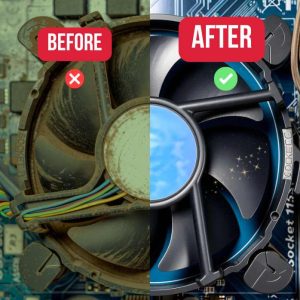
Computers collect “bloat” over time — unnecessary files, caches, old apps, and malware — that drag down performance. A tune-up cleans all of that, plus physically cleans components so your system runs noticeably faster.
2. Lifespan
Overheating, hard drive strain, malware, and other issues shorten your device’s life. Professional tune-ups reduce that wear and catch small problems early, helping your computer last significantly longer.
3. Security
This may be the biggest benefit. Tune-ups remove malware and viruses, apply important security updates, clean malicious browser extensions and redirects, adjust privacy settings, and tighten overall protection. Unmaintained computers become more vulnerable over time.
How Often Should You Get a Computer Tune-Up?
It depends on your usage:
1. Normal User (browsing, streaming, email): Once per year.
2. Work-from-Home Users (heavy daily use): Every 6-9 months.
3. Business Computers & Gamers: Every 6 months.
What Are the Steps of a Computer Tune-Up?
Here’s what a proper tune-up involves:
1. Diagnostic Scans
Technicians check hardware health, CPU/RAM usage, hard drive status, temperatures, and error logs.
2. Malware and Virus Scans
Deep scans remove threats, including rootkits, bad browser extensions, and startup malware.
3. Software Cleanup
Remove unused programs and bloat.
4. Operating System Updates
Safe, proper updates for better speed and security.
5. Disk Cleanup and Optimization
Clear caches and unnecessary files.
6. Physical Cleaning & Inspection
Remove dust from vents, fans, and heatsinks to prevent overheating.
7. Final Review
Technicians verify everything runs smoothly and provide a report.
The Bottom Line
Regular tune-ups extend your computer’s life, boost performance, and protect your data.
Need Help? Contact Computer Repair & Services for expert tune-ups and maintenance. We serve Stillwater, Hudson, and New Richmond.
Contact Us at 651-439-7544


